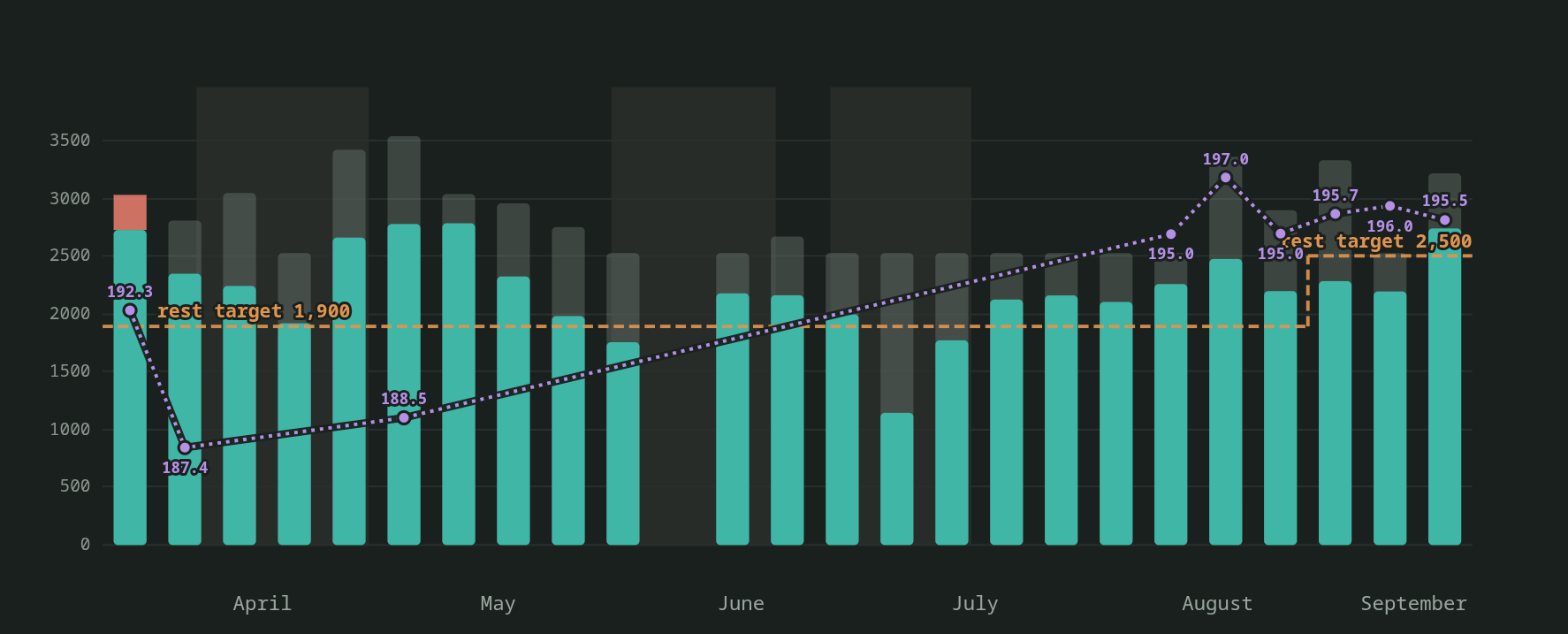
Six months in one chart. Each bar is a week: teal is what I ate, the grey cap is what I burned and did not eat. The dashed line is the rest-day target, the shaded bands are blackouts, and the purple line is weight.
In May I wrote about a nutrition coach that reads my training plan and my plate. Since then it has grown into something I am proud of. It is a full tracking stack that knows what I rode, what I ate, where every number came from, and what tomorrow needs. It runs on my own server and talks to me on Discord. It publishes a report I can open on my phone or hand to someone else. This post is a tour of how it is built and what it does for me.
The architecture
The goal was to have one unified view of all health metrics related to consuming and spending energy. Everything is stored in a Postgres database. The meal table holds every row since April 2, more than 700 of them. A weight table fills itself from my Hume Body Pod (a scale that measures body composition) through Google Health Connect, so weigh-ins arrive without having to enter anything anywhere. A baseline table holds the meals I eat frequently. I eat the same breakfast pretty much every day.
The system is atomic so one command does one thing. For example, one command writes meals, and it is the only thing that does. Before it writes, it runs a resolver that asks intervals.icu (a cycling tracking app) what I have planned today or what I have already completed. The resolver classifies the day as rest or training, picks the calorie bucket and the protein floor, and stamps all three into the row. Every meal carries the context it was eaten in.
The model sits in one settings file. It holds the buckets and their targets, the fraction of ride burn added back on ride days, and the protein floors. It also holds blackout windows for fasts, travel and social days, and dairy-free windows that swap almond milk into my breakfast. When the plan changes, that file changes, with a backup and a dated note.
A set of scheduled jobs runs the day. The baseline breakfast logs itself at 7:02. Check-ins post to Discord at 10:32, 14:03 and 18:57. A summary closes the day at 21:03 and a report with a chart goes out on Sunday evening. A carb-load reminder posts at 16:30 when tomorrow’s ride is hard or long.
Twice a day a job rebuilds the full report, encrypts it, and pushes it to blob storage. A gated page on my site decrypts it for the browser. Every 20 minutes the fuel tile on my daily brief refreshes. Three times a day a drift checker curls each of those pages and confirms it is what it should be.
Three ways a meal gets in
The first path is the baseline. Mu Mu Muesli with berries is my breakfast almost every morning, so at 7:02 the system logs it with the macros already resolved. During a dairy-free window it swaps in the almond milk and recalculates from that brand’s label. I do nothing.
The second path is text. I type what I ate into Discord, as much or as little as I have. “Chopt shrimp spring roll salad.” “Two of the same dosas from the party.” “Premier shake.” The assistant resolves each one to a row. The reply comes back with the row id, the day’s running totals, the protein still to go, and the carbs still to go.
The third path is the camera. I photograph the plate with my hand in frame and the portion sizing works from that. Palm for a protein portion, fist for a cup, thumb for a tablespoon. For a bowl from a delivery app, the listing photo goes in first. The real bowl replaces it when it arrives, photographed the same way.
This is the part I still find the most satisfying. A phone photo at a party table becomes a row with nine numbers on it.
Where the numbers come from
Every row carries calories, protein, carbs, fat, fiber, total sugar, added sugar, sodium and saturated fat. Every row also carries two provenance tags, one for the macros and one for the micros, and each tag is one of three words.
Label means I photographed the physical nutrition panel. The assistant reads it and the numbers go in as printed. When a label and the vendor’s website disagree, the label wins, because the box is what I ate.
Vendor means the chain publishes its data. Chopt, Chipotle, Premier Protein, RXBAR: their own panels and PDFs are the source, and the row says so.
Estimate means the row was built. For a restaurant plate or a home-cooked meal, the assistant decomposes the dish into components. It pulls each one from USDA FoodData Central by its database id and scales it to the portion in the photo. The component list goes into the row note. Sodium gets special treatment: an unsalted floor per component plus a stated seasoning allowance, so the allowance is visible and correctable. A local cache keeps the USDA calls cheap.
On the report, any estimated number carries a tilde.
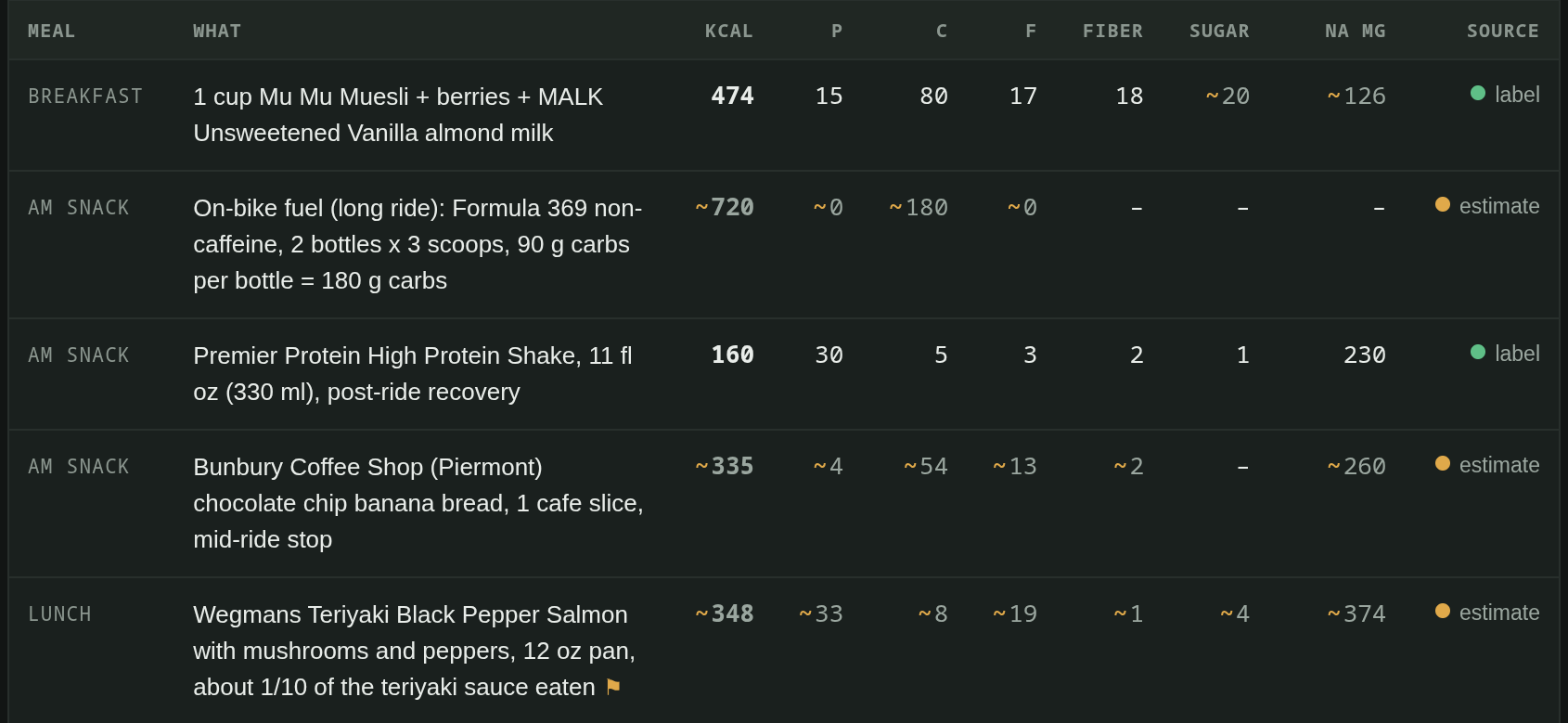
Meals from Sep 19. Plain numbers came off a label. A tilde and an amber dot mark an estimate, down to a single cell: the muesli is a label row, but its sugar and sodium are estimated.
That tag is the feature I did not know I needed. Roughly half of my rows are estimates, because I eat out in New York and restaurants do not publish panels. Now I can see that at a glance, and so can anyone I share the report with.
Targets that know what I rode
This is still the part no app on the App Store does. The resolver reads completed activities from intervals.icu, not the plan, so a ride that ran longer than scheduled counts for what it was. Rest days, easy rides, hard rides and long rides each carry their own calorie target and protein floor. On ride days a fraction of the measured burn is added back on top of the baseline, and the carb target absorbs the difference.
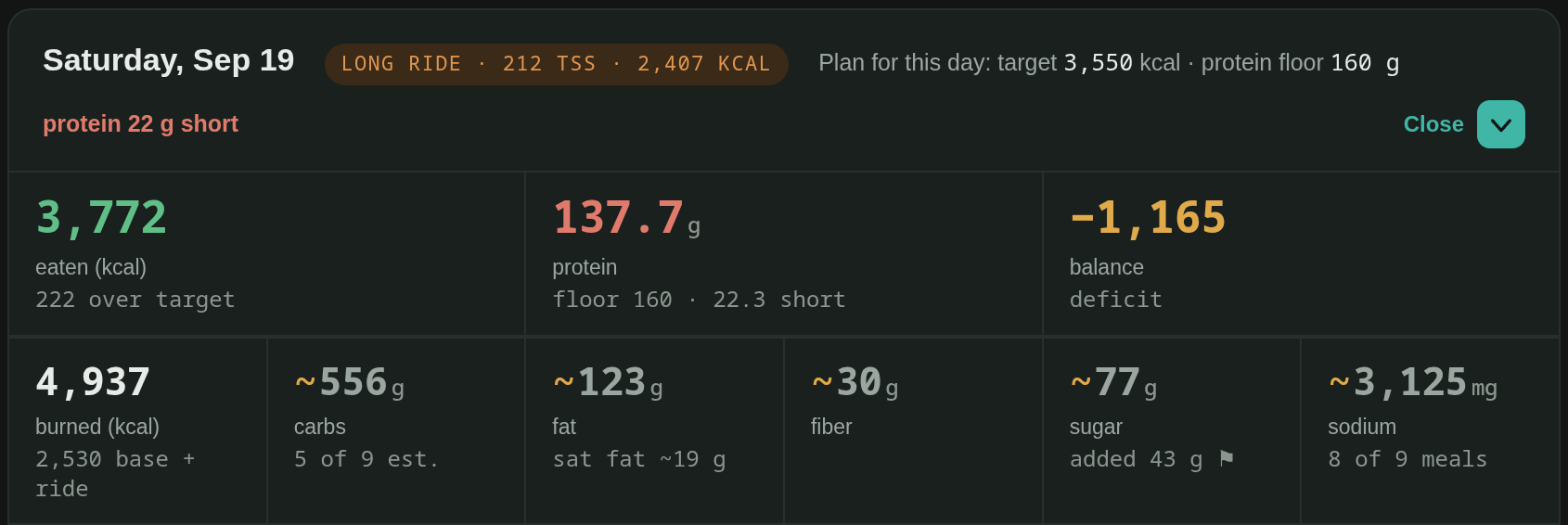
The day card for Saturday’s 59 miles. The ride sets the day: a 3,550 kcal target instead of the 2,500 of a rest day, and a burn of 2,530 base plus the ride.
The lookahead runs the other way. Every afternoon at 16:30 it reads tomorrow’s planned workout from the intervals.icu calendar. If tomorrow is a hard or long ride, it posts a reminder with tomorrow’s calorie and carb targets. Carbs go high at every meal today, it says. After every meal I log on such a day, the reply prints how many carbs I have put away against the day’s carb target. The night before a long ride, the system is doing the arithmetic I used to do in my head, badly.
Added sugar gets called out on every row that has it, with grams and daily value. No added sugar is a standing rule and I want to see it even when I chose it. During a ride and around it, that call-out goes quiet. Ride fuel is functional and I do not need a lecture at mile 40.
A day on Discord
The whole day sits in one thread. Breakfast is already there when I wake up. I send a photo of lunch and get back a row, the totals, and what is left. At 16:30 the lookahead tells me whether tonight is a carb-load night. At 21:03 the summary closes the day against the day’s own target, not a generic one. On Sunday evening the weekly report arrives with a chart of the week’s calories, protein and weight.
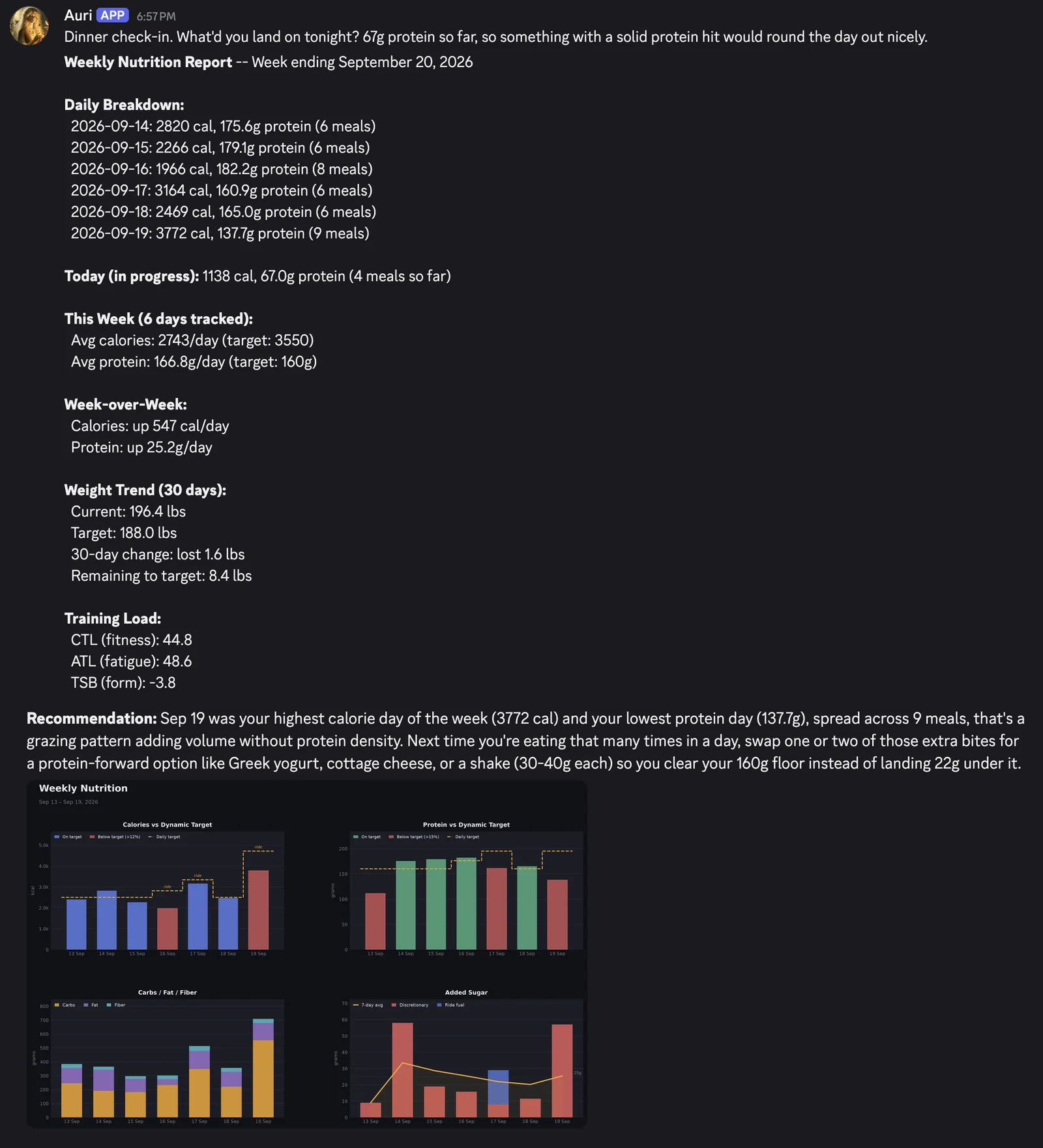
The Sunday report, exactly as it lands in the thread. Six days of numbers, the week against its target, weight and training load, then a recommendation and the chart. The two halves are stitched from two screenshots.
If I say I am going to eat something, it goes in as a provisional row and comes out if I change my mind. If I correct a number, the correction is decomposed, not scaled: fix the rice, leave the fish. Backdating works too. A meal logged a day late gets that day’s resolver run, so it carries that day’s target and floor, not today’s.
The report
The report at my site opens with a verdict. Over one stated window, it answers three questions: am I eating enough, am I hitting protein, is the goal on track. Below that, month rows preview days logged, days at the floor, and the average. Five filter chips let me pull up only ride days, or only days under the floor. Each chip’s count runs over exactly the days it filters.
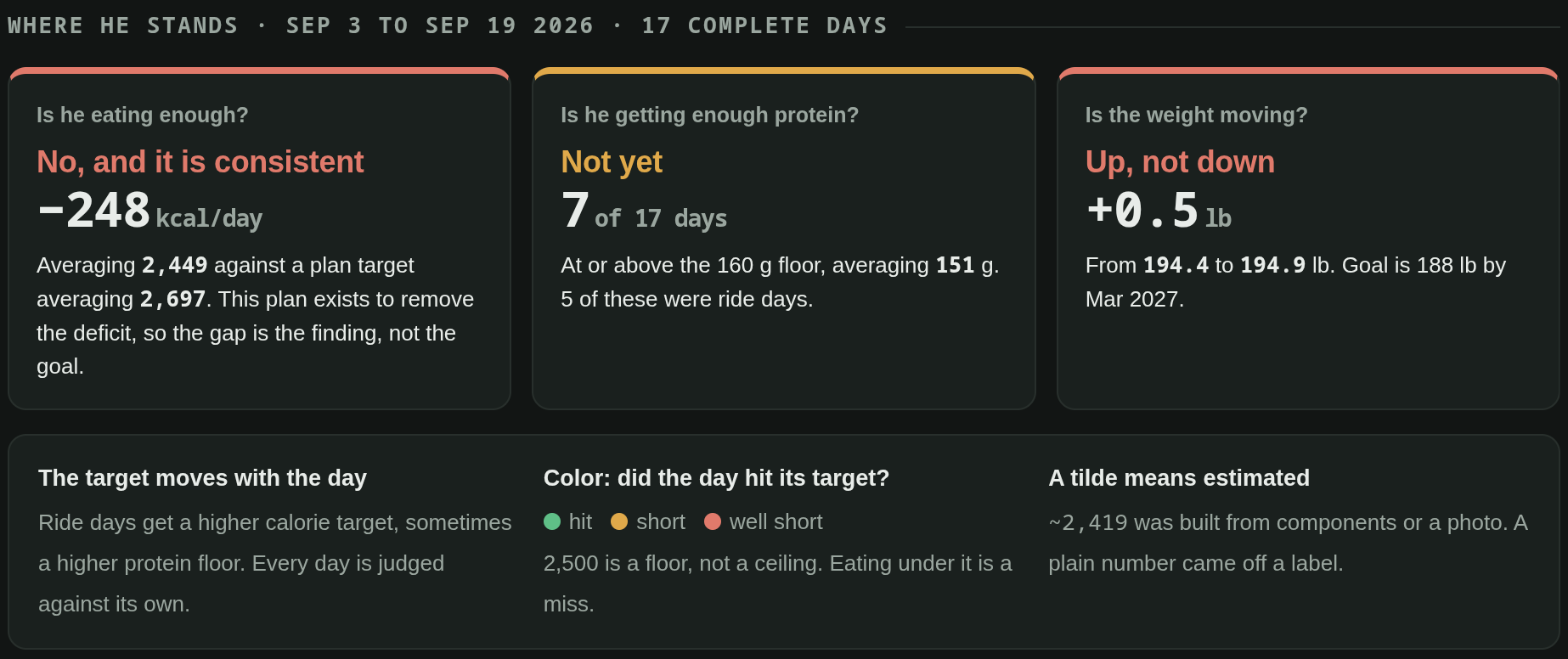
The verdict. One stated window, three questions, answered before anything else on the page.
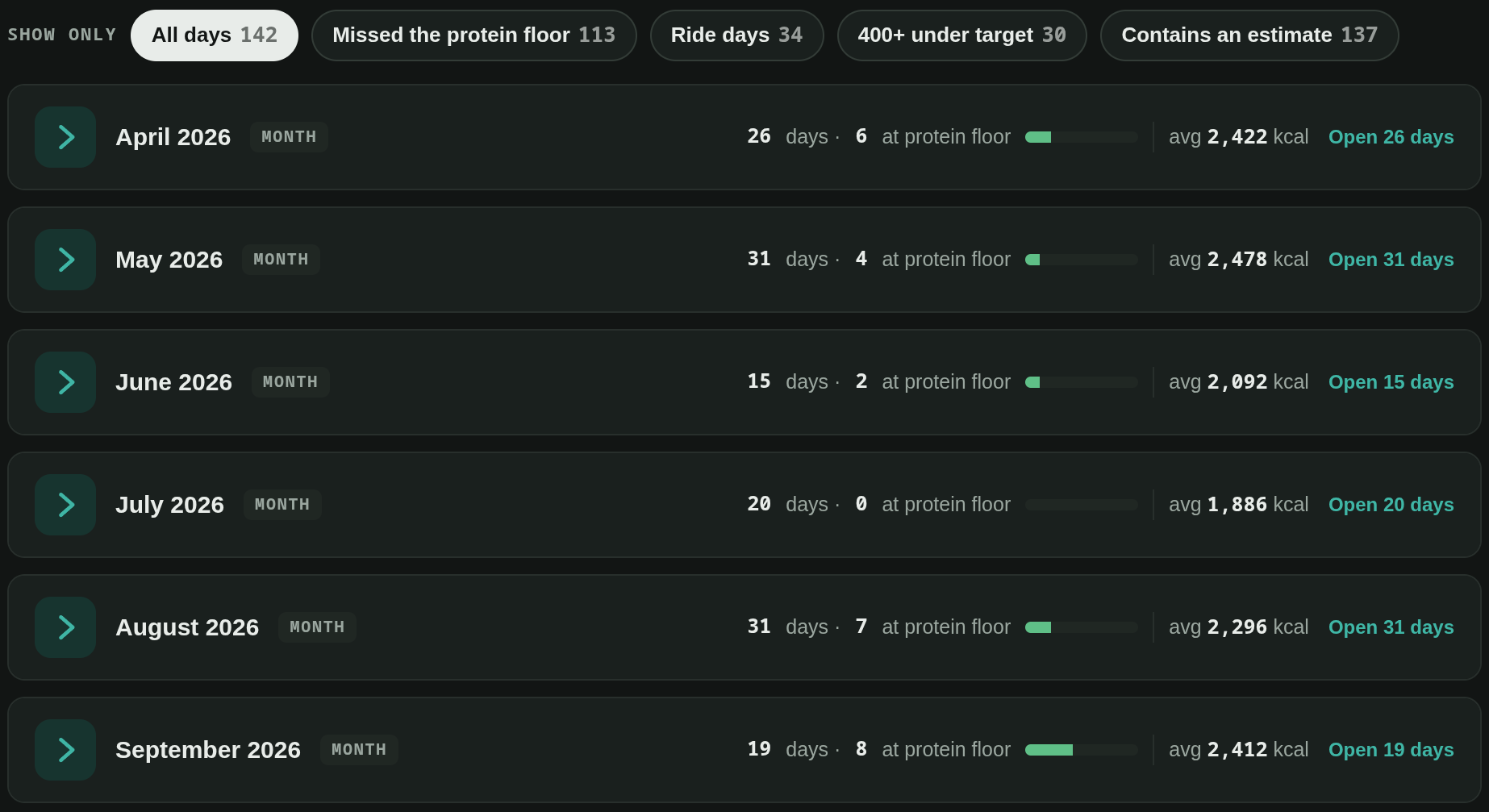
The daily log, closed. The five chips with their counts, and a row per month. A month opens into day cards like the one above.
Each day is a card. The header shows the day type, the ride, that day’s target and floor, and the meal count. Three lead tiles show the day at a glance, and a drawer opens six more: fiber, sugar, added sugar, sodium, saturated fat and coverage. The meals table lists every row with a one-word source column and a coloured dot for label, vendor or estimate. Any single estimated number is dimmed with a tilde.
Further down the page sit the body composition scan and the metabolic test, with the clinic PDFs downloadable behind the same gate. The blood panel sits below them with the lab PDFs beside it. Weight comes from the Body Pod automatically. The whole page passes accessibility checks with zero violations and fits a phone screen exactly.
Sharing is built in. A second reader gets a password, and that password mints a guest identity scoped to the nutrition page alone. The report is encrypted with AES-256-GCM before it leaves my server, so the hosting side only ever holds ciphertext. Blackout days show on the shared view as blackouts, with no reason attached.
The brief
The daily brief at my site has a fuel tile that refreshes every 20 minutes from the same table. Calories so far, protein so far, today’s target, the floor. It sits next to my calendar and the day’s other items. The nutrition picture is on the same page as everything else I check in the morning.
What it actually does for me
The plain answer is that I log. For years I tried the app-store trackers and quit each one inside a month. Since April 2, 143 of the 172 days have rows in the table. The other 29 are all declared blackout days, fasts and travel, where logging pauses on purpose. It stuck because it costs me a sentence or a photo, and because the reply is useful in the same minute.
I fuel rides properly now. On a 125k in early September I took in 34 grams of carbs an hour. The system flagged it against the 60 to 90 that a ride like that needs. Last Saturday I rode 59 miles at 66 grams an hour. The plan for the ride was in my hands the day before. The reminder to keep carbs high at every meal sat in the thread from Friday afternoon.
I eat protein on purpose instead of by accident. Today’s lunch was two leftover dosas from a party. The reply said 93 grams still to go, so I added a shake and a beef stick before I put the plate away. That decision used to happen at 9 PM, or not at all.
My rule is no added sugar, and now I can see whether I keep it. Over ten days in early September the daily median was under half a gram. Two days went over 20 grams, both on purpose, and both got flagged anyway. The number is what makes the rule real.
It’s a personal tool that I built for me to scratch all the itches I had… As it turns out, now it’s a comprehensive assessment and track record of energy entering and leaving my body. Now, if only the dashboard could get me into the gym to start strength training. I’ll work on that!